Inventory & Stock Management
Complete user guide for Pindah Basa
Warehouse staff. Store managers. Inventory controllers. Procurement. Finance.
Know what you have, where it is, and how it moved — catalogue, receipts, transfers, stock takes, pricing, and reports in one connected module of Pindah Basa.
| Product | Pindah Basa — Inventory & Stock Module |
| Publisher | Pindah Private Limited |
| Website | www.pindah.org |
| Platform | basa.pindah.org |
| Contact | admin@pindah.org · +263 714 856 897 |
Pindah Private Limited builds Pindah Basa, the operating platform for organisations that have outgrown fragmented systems. Stock, accounting, pharmacy, and procurement share one data layer — multi-location quantities, FEFO batches where used, and valuation that feeds the general ledger.
Learn more at pindah.org
When your operations outgrow the systems that built them.
Executive Summary
Inventory & Stock answers three questions at all times: what do we have, where is it, and how did it move.
From this module you manage the product catalogue, categories, warehouses and stores, suppliers, purchase receipts (goods receiving), transfers between branches, physical stock takes, markup rules and price approvals, POS tills, packages, and movement reports. Every sale in Accounting, every pharmacy dispense, and every stock receipt that posts to GL flows through these records.
The Stock Dashboard shows carrying value (IAS 2), stock health, receipts vs issues, reorder proposals, and NRV / dead-stock candidates — filterable by location.
Who This Is For
| Role | How they use Stock |
|---|---|
| Warehouse staff | Receive goods, pick transfers, stock takes |
| Store managers | Monitor levels, approve prices, review reports |
| Inventory controllers | Catalogue, reorder levels, audit movements |
| Procurement | Suppliers, stock receipts / orders |
| Cashiers | Tills linked to locations (sales in Accounting POS) |
| Finance | Valuation, movement reports, costs feeding GL |
Key Capabilities
- Stock dashboard with KPIs, health, reorder and NRV insights
- Full product catalogue with bulk add, barcodes, categories
- Categories (hierarchical), suppliers, locations, units, pack sizes
- Stock receipts / purchase orders (Draft → Pending → Partial → Received)
- Stock takes with progress, variances, In Progress / Completed / Cancelled
- Stock transfers (Request → approval → in transit → received / completed)
- Issue/Transfer for internal issues (via Accounting POS transfer mode)
- Markup rules (Global, Category, Supplier, Product priority)
- Price change approvals queue
- Product packages (bundles for quick sales)
- Till management per location
- Reports: item movements, purchases, sales, issues, summary by item / customer
Important Concepts
| Term | Meaning |
|---|---|
| Product | Item you buy, stock, and sell — name, code, category, costs, sell price, reorder level |
| Location | Warehouse, store, or stock point; quantities are per location |
| Till | POS terminal tied to a location (e.g. L-10141) |
| Stock receipt / Order | Supplier receipt progressing Draft → Pending → Partial → Received |
| Markup rule | Formula for sell price from cost; priority Product → Supplier → Category → Global |
| Price change request | Proposed price awaiting manager approval |
| Stock take | Physical count vs system quantities; variance report |
| Stock transfer | Controlled move between locations |
| Package | Bundle of products sold together at POS |
| FEFO / batch | Earliest-expiry-first (pharmacy / perishables) |
| Carrying value | Inventory valuation (IAS 2) on the dashboard |
Menu Map (sidebar)
Open Stock in the left sidebar of Pindah Basa.
| Menu item | Route |
|---|---|
| Dashboard | /stock/dashboard |
| Inventory | /stock/inventory/list |
| Packages | /stock/inventory/packages |
| Stock Takes | /stock/stocktakes |
| Categories | /stock/categories |
| Suppliers | /stock/suppliers |
| Locations | /stock/locations |
| Units | /stock/units |
| Pack Sizes | /stock/pack-sizes |
| Tills | /stock/tills |
| Orders | /stock/orders |
| Transfers | /stock/transfers |
| Issue/Transfer | /accounting/sales/create/transfer |
| Markup Rules | /stock/inventory/markups |
| Price Approvals | /stock/inventory/price-approvals |
| Reports | /stock/reports |
Table of Contents
- Getting Started
- Stock Dashboard
- Products (Inventory)
- Packages
- Categories
- Suppliers
- Locations
- Units and Pack Sizes
- Tills
- Stock Receipts (Orders)
- Stock Transfers
- Issue / Transfer
- Stock Takes
- Markup Rules
- Price Approvals
- Reports
- How Stock Connects to Other Modules
- Setup Guide for New Organisations
- Daily and Monthly Routines
- Troubleshooting
Getting Started
- Sign in to basa.pindah.org.
- Confirm location / till in the top bar.
- Open Stock in the sidebar → Dashboard.
- For first-time setup, follow Setup Guide for New Organisations.
Tip: Ctrl+K jumps to any Stock screen by name.
Stock Dashboard
Path: Stock → Dashboard
URL: /stock/dashboard
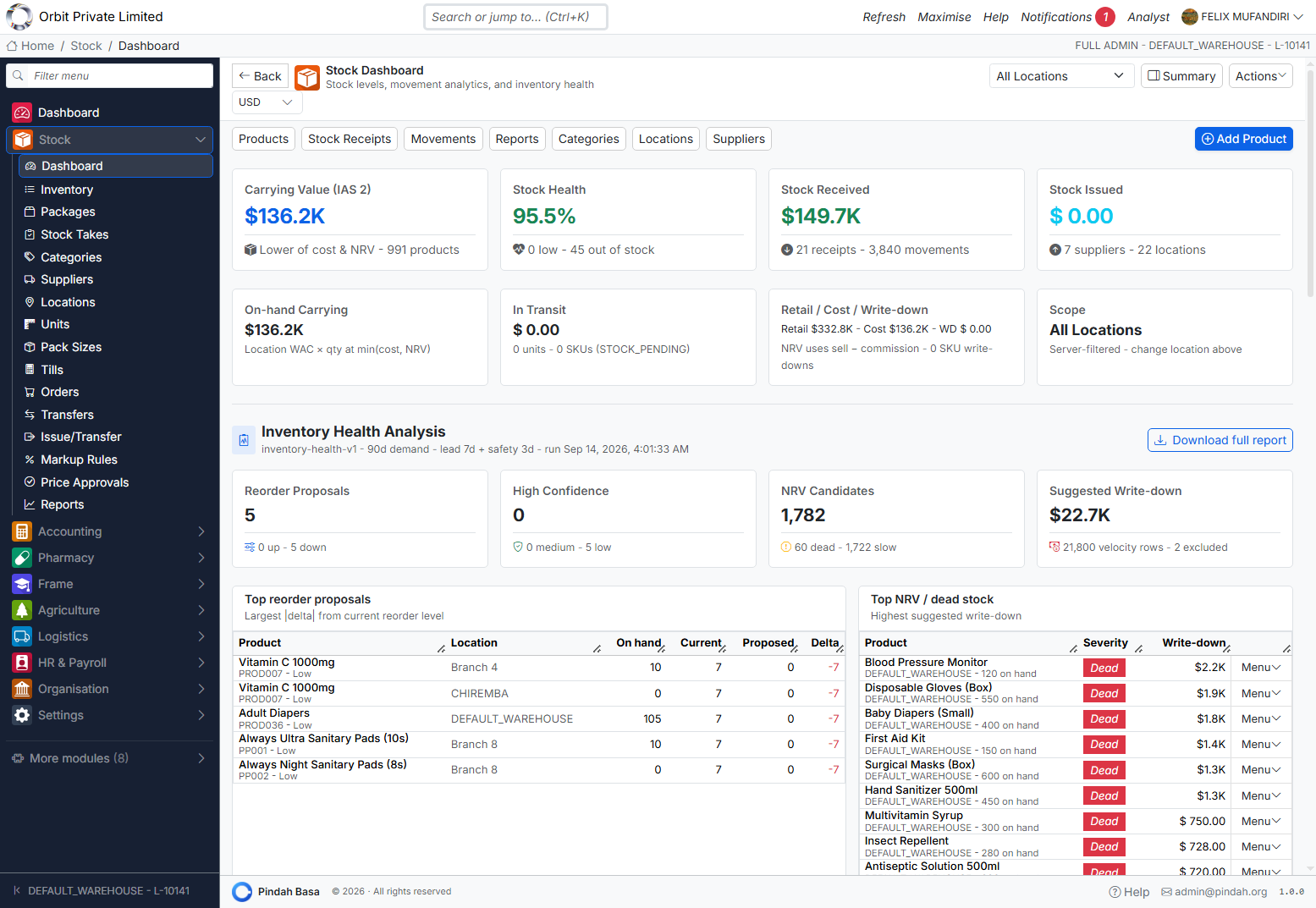
What you see
| Metric | Meaning |
|---|---|
| Carrying Value (IAS 2) | Inventory valuation and product count |
| Stock Health | % healthy; out-of-stock count |
| Stock Received | Value / receipts / movements in period |
| Stock Issued | Issues / suppliers / locations context |
| On-hand / In transit / Retail vs cost | Position and retail comparison |
| Inventory Health Analysis | Reorder proposals, NRV / dead stock, suggested write-down |
Controls
| Control | Purpose |
|---|---|
| Location filter | Scope to one branch or All Locations |
| Summary | Condensed view |
| Actions | Add Product, Receive Stock, Transfer Stock, View Products, Reports, Download Health Report |
| Tabs | Products, Stock Receipts, Movements, Reports, Categories, Locations, Suppliers |
Tables at the bottom highlight Top reorder proposals and Top NRV / dead stock with row menus.
Products (Inventory)
Path: Stock → Inventory
URL: /stock/inventory/list
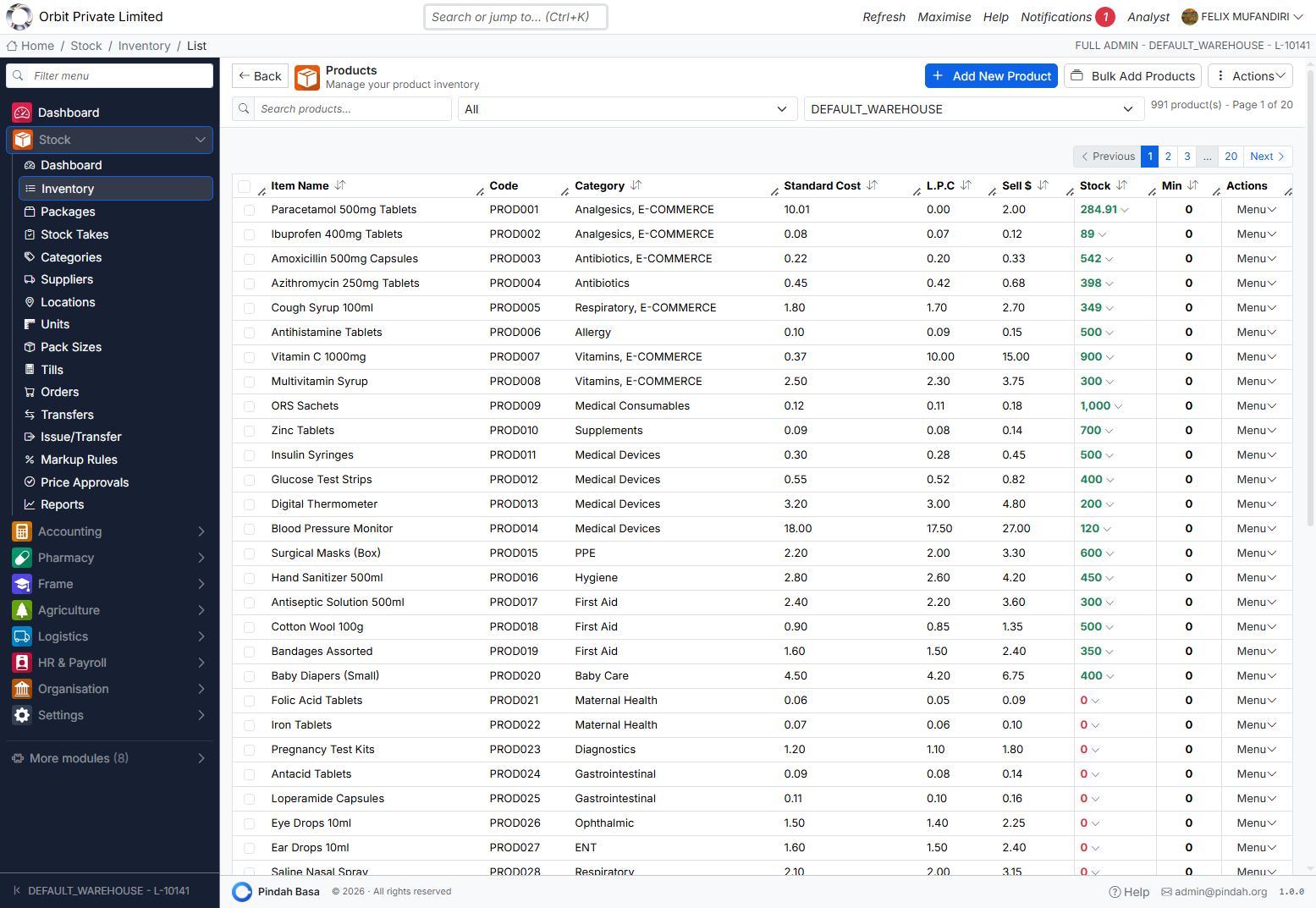
List
Shows name, code (PROD…), category, Standard Cost, L.P.C. (last purchase cost), Sell $, Stock (green / red for zero), Min (reorder), Menu.
Filter by search, category, and warehouse. Paginate large catalogues.
Header actions
| Action | Purpose |
|---|---|
| + Add New Product | Single product form (/stock/add) |
| Bulk Add Products | Spreadsheet-style multi-add (/stock/inventory/new) |
| Actions | Download, barcodes, email summary, bulk category, delete selected |
Typical row / product actions
Edit; create sale; issue; receive stock; stock take; generate barcodes — exact menu depends on permissions.
Adding a product
- + Add New Product.
- Enter Name, Code, Category, Supplier, Cost, Sell price, Reorder / Min, Unit, optional barcode.
- Set opening quantity per location if needed.
- Save.
Bulk add
- Bulk Add Products.
- Use template / paste rows.
- Validate and save.
Packages
Path: Stock → Packages
URL: /stock/inventory/packages
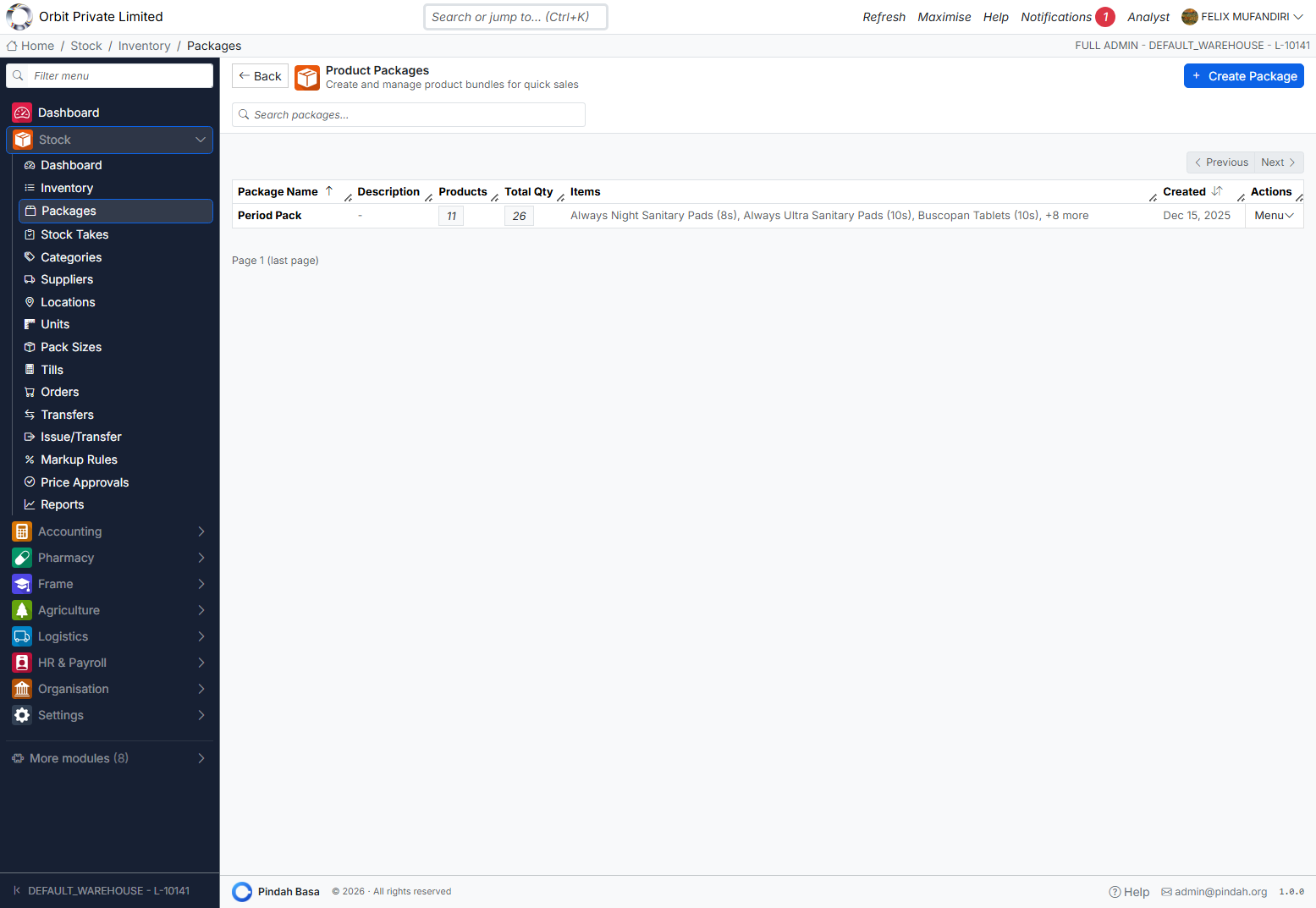
Bundles for quick POS sales (e.g. “Period Pack” with multiple lines).
- + Create Package — name, description, component products and quantities.
- Search existing packages.
- Row Menu → Edit / Delete.
Columns: Package Name, Description, Products (count), Total Qty, Items preview, Created.
Categories
Path: Stock → Categories
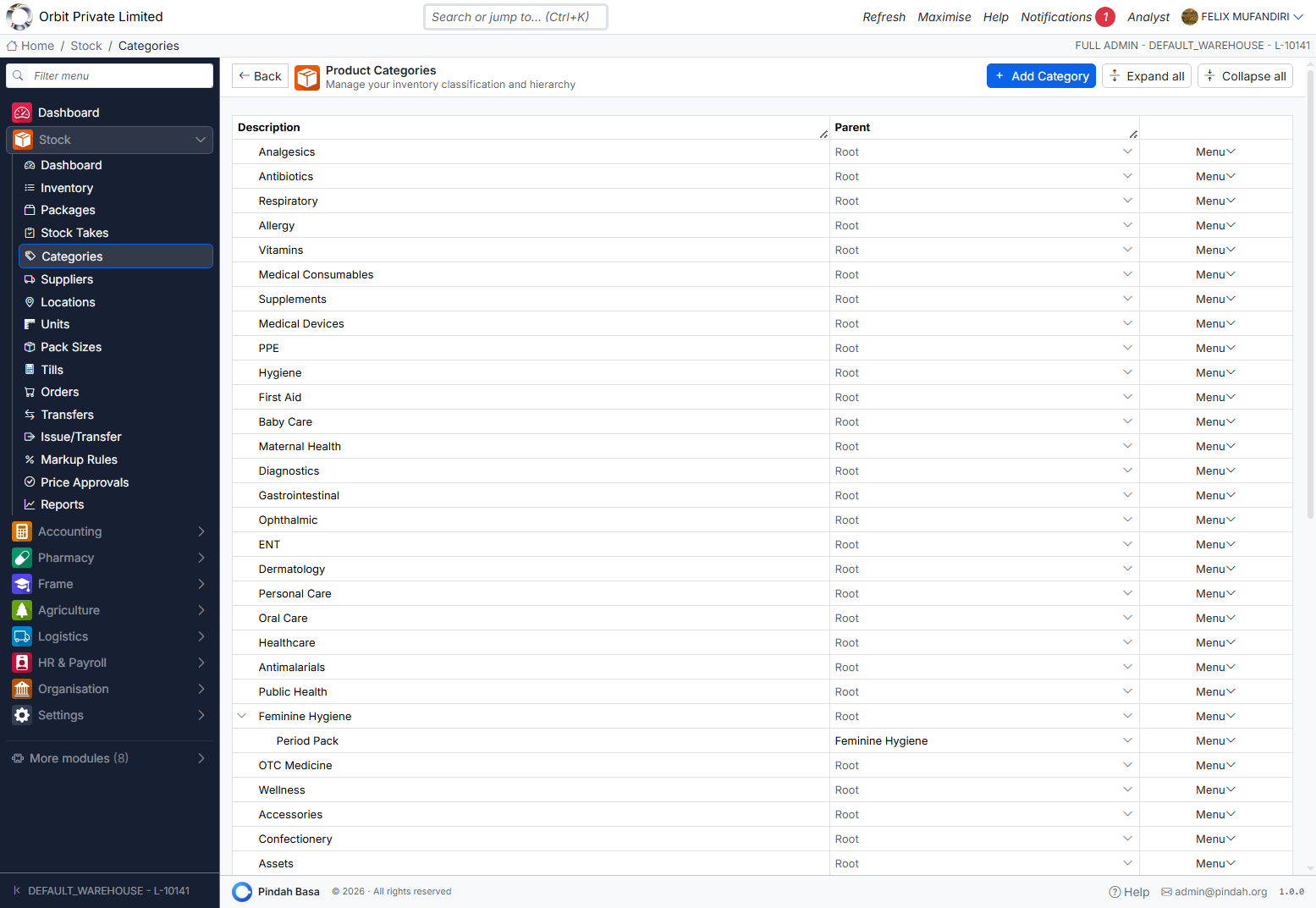
Hierarchical classification (root and child, e.g. Feminine Hygiene → Period Pack).
| Action | Purpose |
|---|---|
| + Add Category | New category / parent |
| Expand all / Collapse all | Tree view |
| Row Menu | Edit, delete, re-parent |
Assign products to categories for filtering, markups, and reports.
Suppliers
Path: Stock → Suppliers
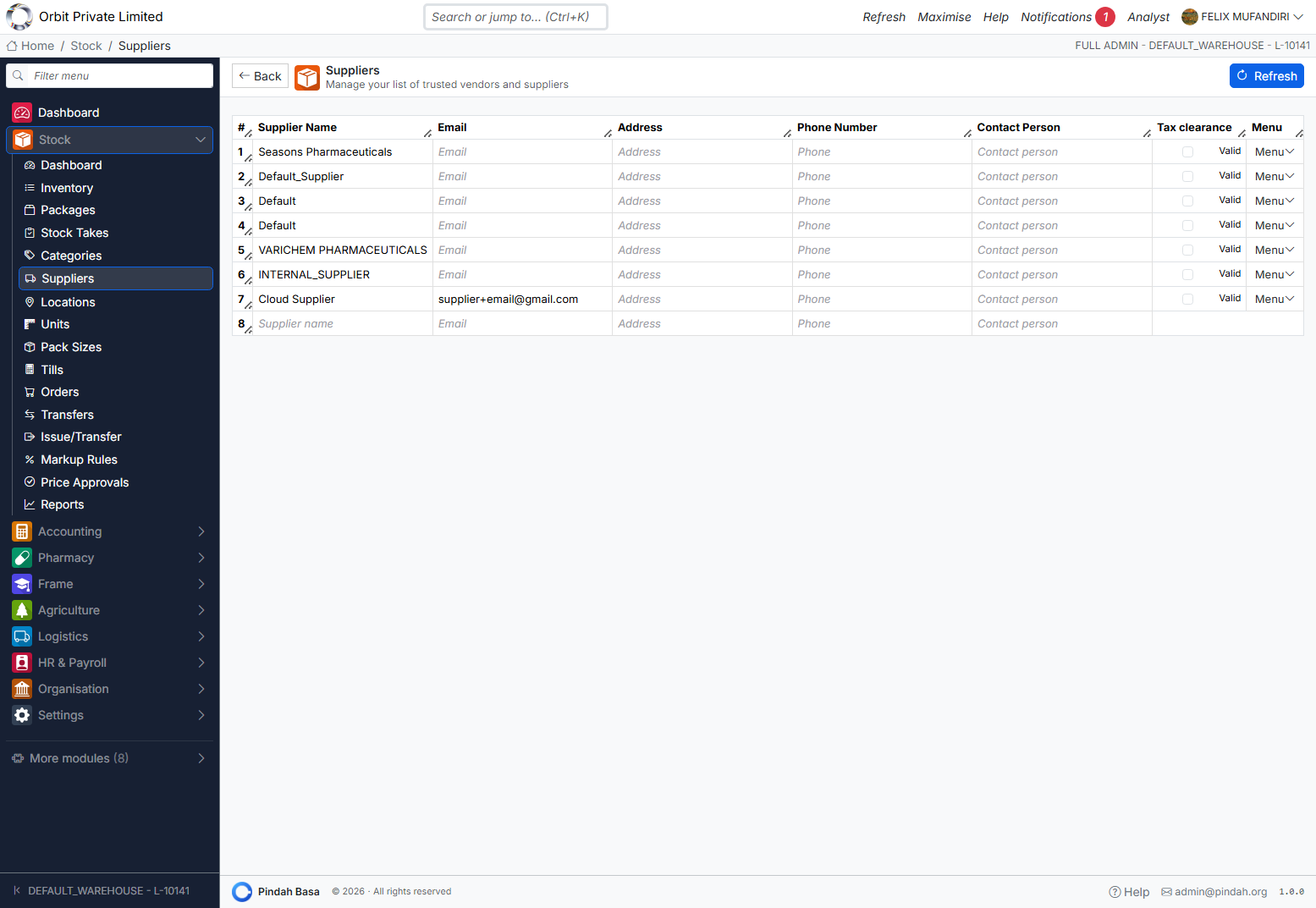
Vendor master used on receipts and products.
Inline fields: Supplier Name, Email, Address, Phone, Contact Person, Tax Clearance (Valid). Use Refresh to reload. Add a blank row at the bottom for a new supplier.
Locations
Path: Stock → Locations
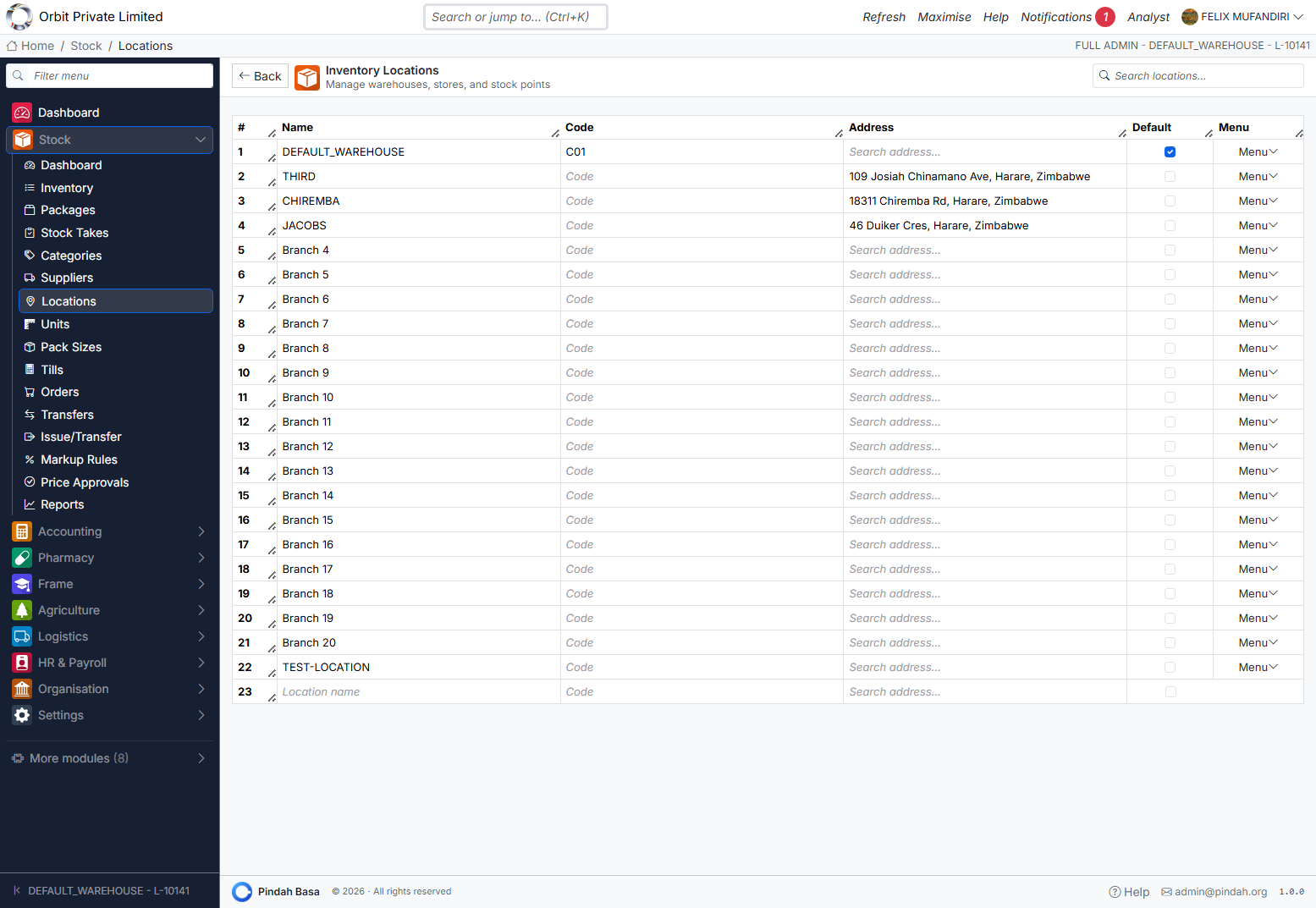
Warehouses, stores, and branches.
| Column | Notes |
|---|---|
| Name | e.g. DEFAULT_WAREHOUSE, Branch 4 |
| Code | Short code (e.g. C01) |
| Address | Optional |
| Default | One location marked default |
Add a new location on the empty bottom row. Every quantity and till is tied to a location.
Units and Pack Sizes
Units (/stock/units) — units of measure (each, box, litre, …) assigned on products.
Pack Sizes (/stock/pack-sizes) — pack definitions for purchasing and selling in multiples.
Maintain these before bulk-loading products so codes stay consistent.
Tills
Path: Stock → Tills
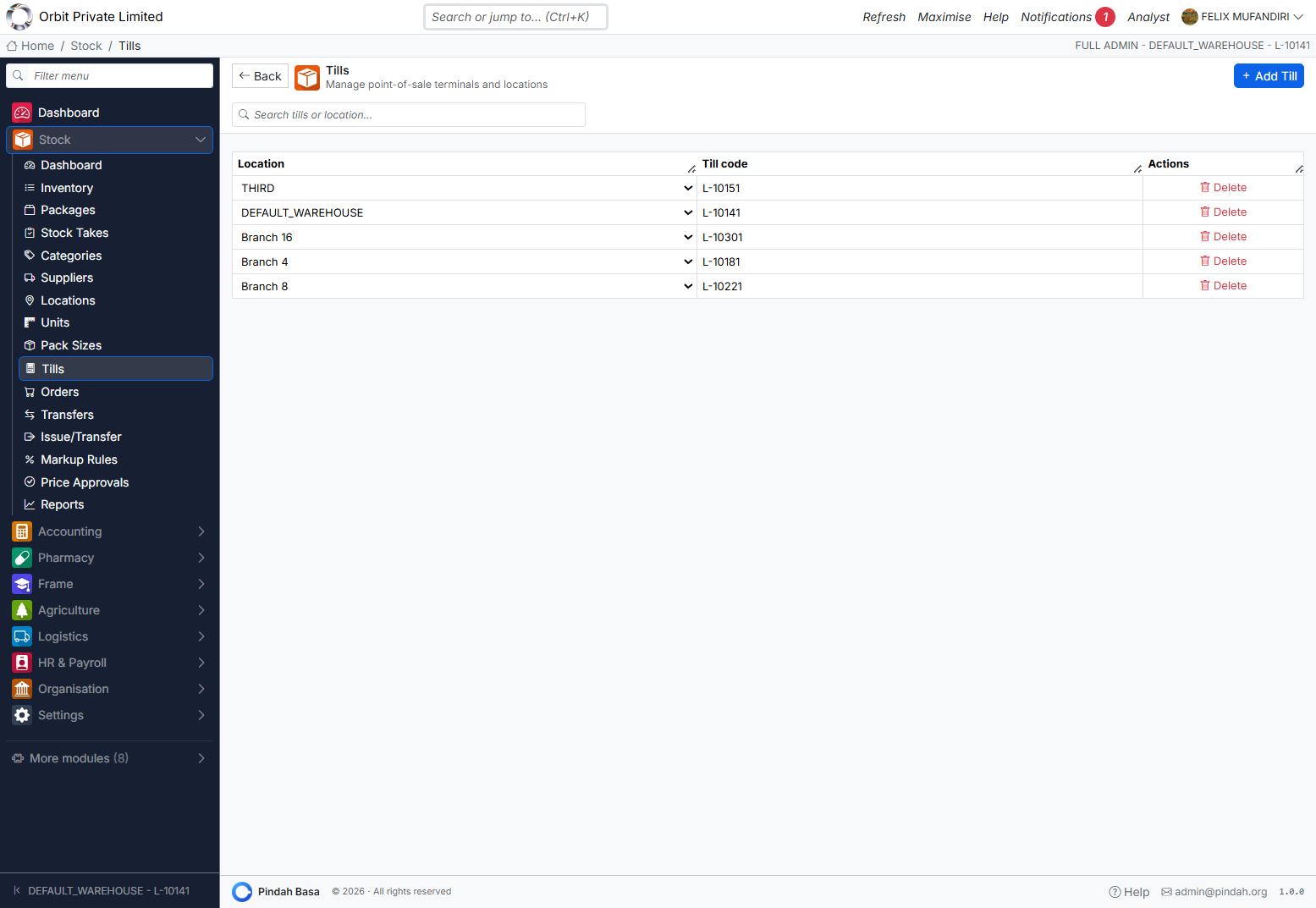
POS terminals linked to locations.
| Column | Example |
|---|---|
| Location | DEFAULT_WAREHOUSE |
| Till code | L-10141 |
| Actions | Delete |
+ Add Till creates a terminal for a location. Accounting POS and stock issues require a till to load products and deduct stock correctly.
Stock Receipts (Orders)
Path: Stock → Orders
URL: /stock/orders
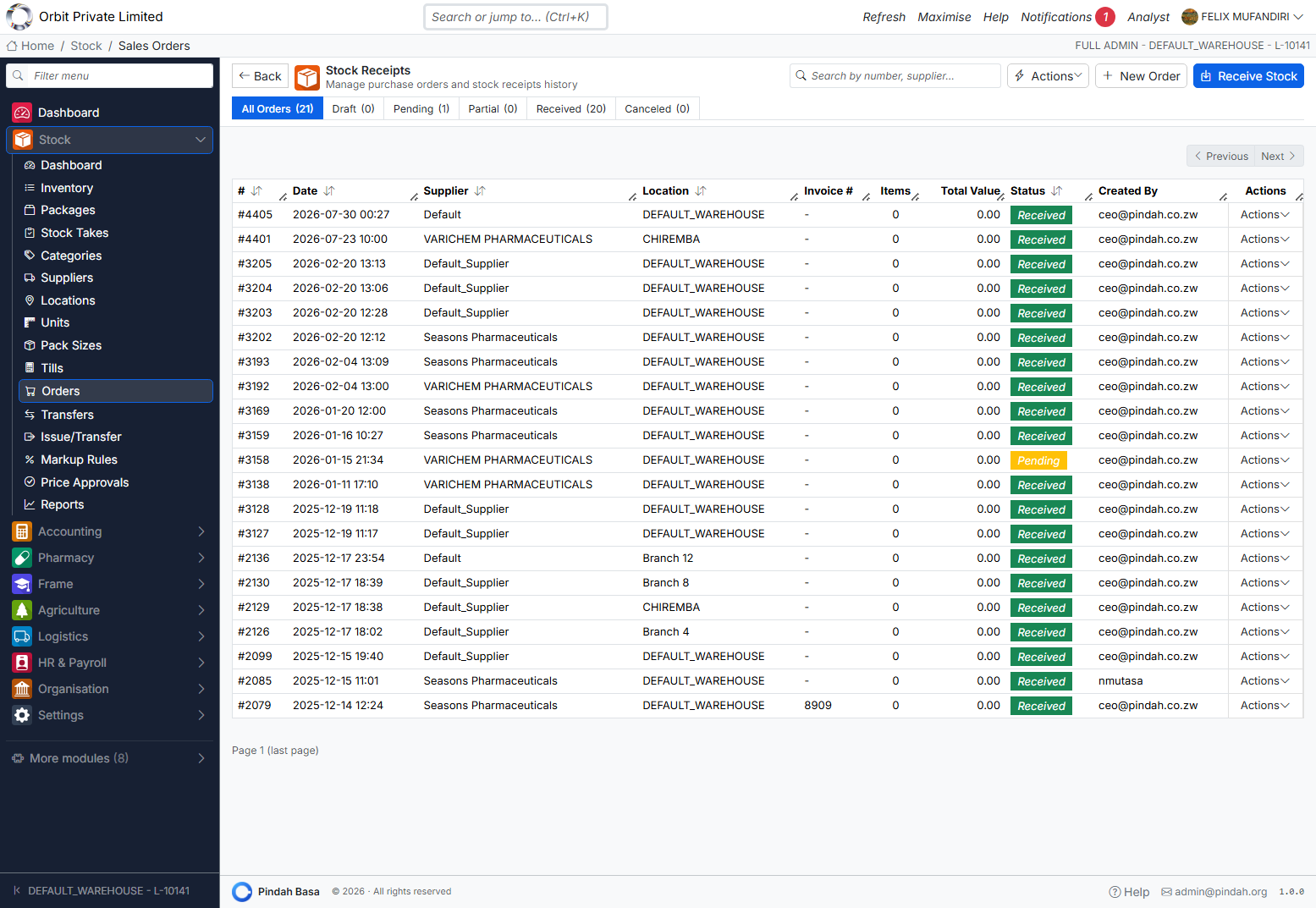
Title: Stock Receipts — purchase orders and receiving history.
Status tabs
All Orders | Draft | Pending | Partial | Received | Canceled
Actions
| Button | Purpose |
|---|---|
| + New Order | Create purchase / receipt draft |
| Receive Stock | Open receiving flow (/stock/orders/receive) |
| Actions | Extra tools / exports |
Columns
#, Date, Supplier, Location, Invoice #, Items, Total Value, Status, Created By, Menu.
Receiving workflow
- Receive Stock or open a Pending order → Fulfill.
- Confirm location, supplier, invoice number, lines, batch/expiry if used.
- Complete receive — stock increases; Accounting may post
GOODS_RECEIVEDwhen costing is present.
Statuses: Draft → Pending → Partial → Received (or Canceled).
Stock Transfers
Path: Stock → Transfers
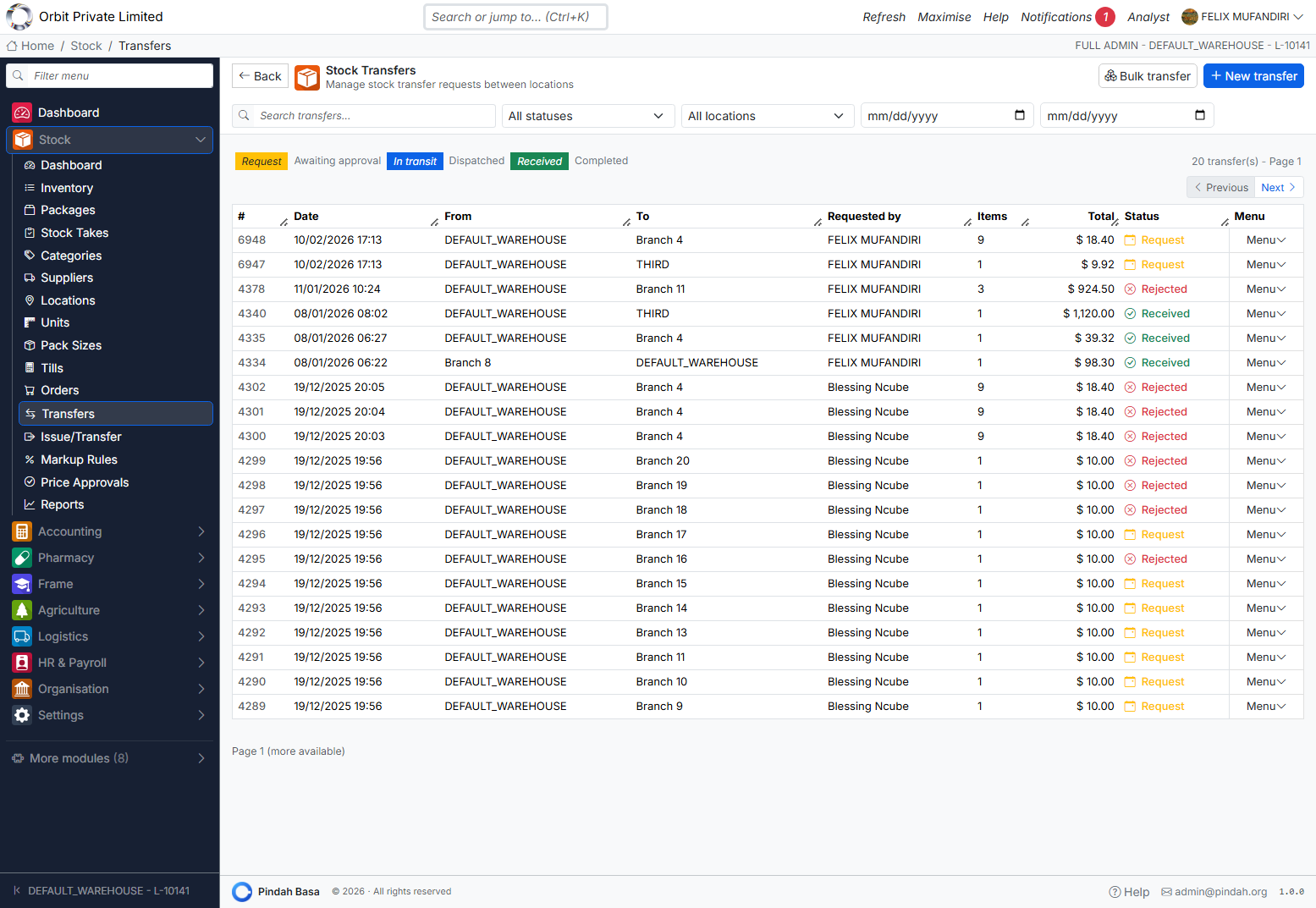
Move stock between locations with a controlled lifecycle.
Status tabs
Request | Awaiting approval | In transit | Dispatched | Received | Completed (plus Rejected on rows)
Actions
| Button | Purpose |
|---|---|
| + New transfer | Create request (/stock/transfers/create) |
| Bulk transfer | Multi-line / multi-item transfer (/stock/transfers/bulk) |
Typical flow
Request → Awaiting approval → In transit / Dispatched → Received → Completed
                              ↘ Rejected
- Create transfer: From location/till → To location, add items.
- Approver accepts or rejects.
- Dispatch / mark in transit.
- Destination Receives — quantities move; GL may post transfer events.
Filter by status, location, and date range. Search by transfer id.
Issue / Transfer
Path: Stock → Issue/Transfer
URL: /accounting/sales/create/transfer
Opens the Accounting Issue/Transfer (POS transfer mode) for internal stock issues without a customer sale — creates a transfer / issue request that completes through Stock transfers and stock deduction at the till’s location.
Use for: branch replenishment, internal consumption, warehouse-to-store moves when using the POS-style picker.
Stock Takes
Path: Stock → Stock Takes
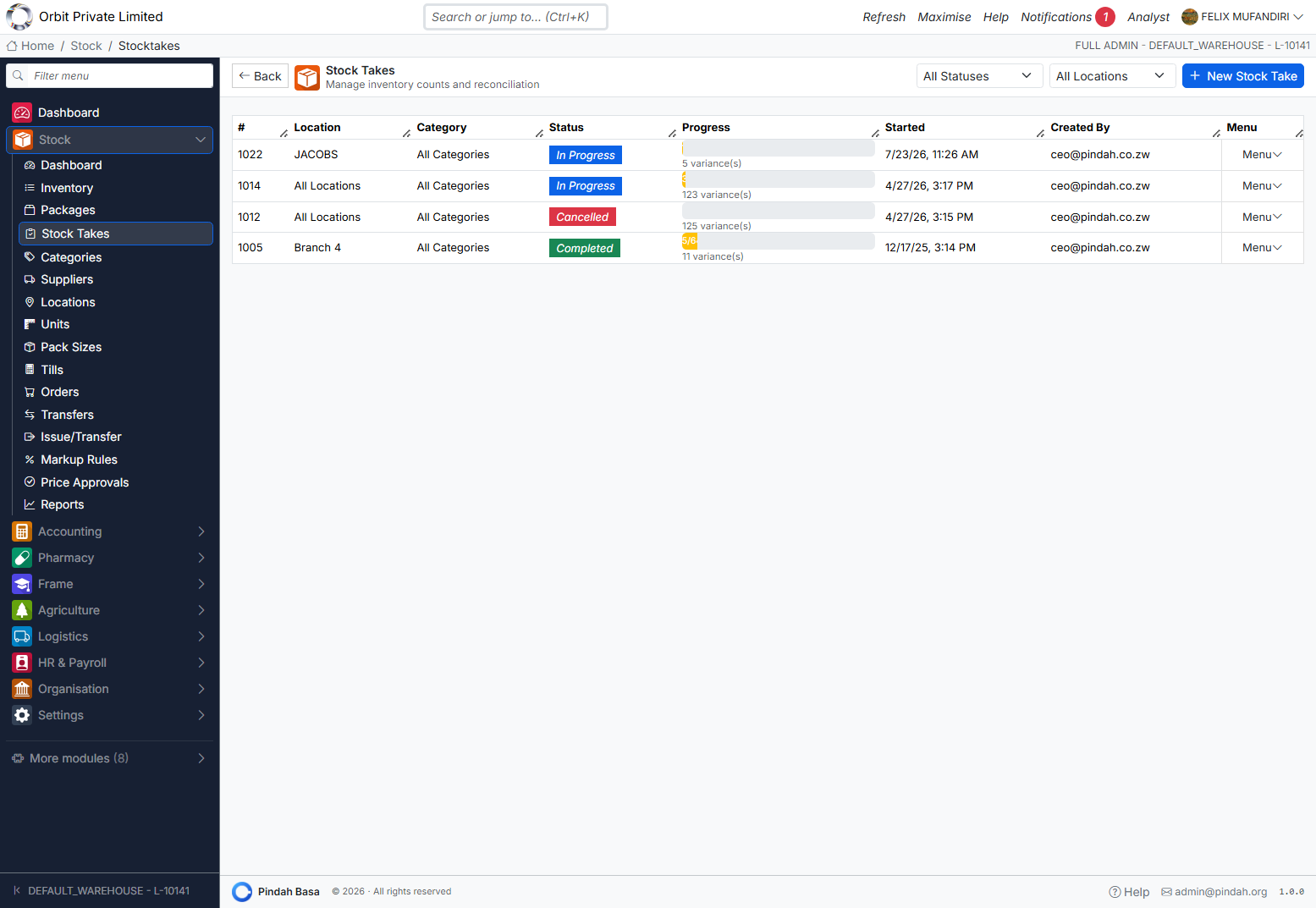
Physical counts and reconciliation.
List
Filter All Statuses / All Locations. + New Stock Take.
| Column | Meaning |
|---|---|
| # | Stock take id |
| Location | Branch or All Locations |
| Category | Scope of count |
| Status | In Progress / Completed / Cancelled |
| Progress | Variance count / progress bar |
| Started / Created By | Audit |
Counting
- + New Stock Take — choose location (and category if offered).
- Open count screen (
/stock/stocktakes/:id/count). - Enter counted quantities (blind count / scan where enabled).
- Review variances.
- Complete — system adjusts stock; Cancel abandons without applying.
Markup Rules
Path: Stock → Markup Rules
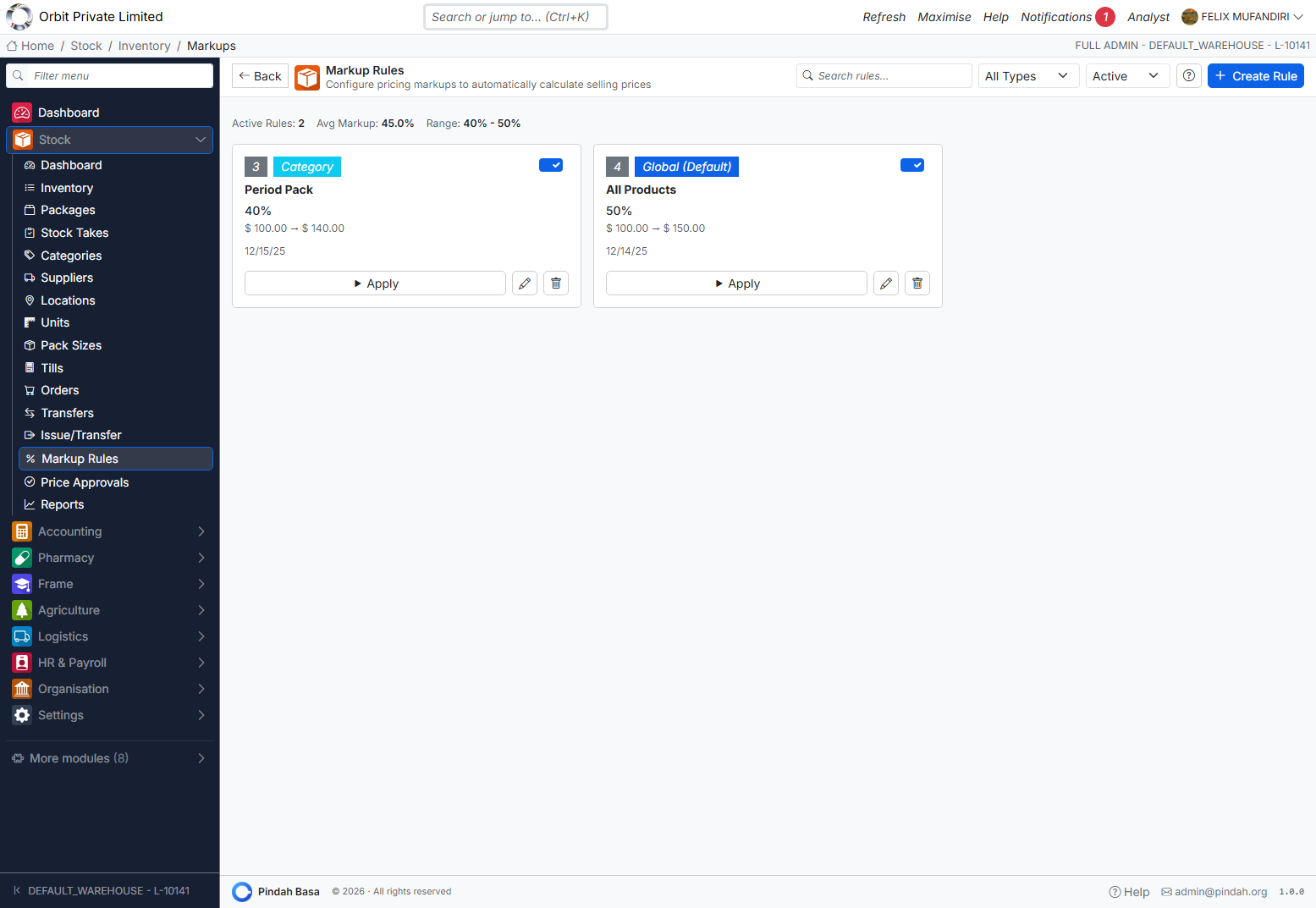
Automatic sell-price calculation from cost.
Priority (most specific wins)
Product → Supplier → Category → Global
Screen
- Search / filter by type and Active
- Stats: Active Rules, Avg Markup, Range
- Cards show type badge (Category, Global), %, price range, Apply, Edit, Delete
- + Create Rule
After creating or changing a rule, use Apply so products recalculate. Resulting price changes may enter the Price Approvals queue.
Price Approvals
Path: Stock → Price Approvals
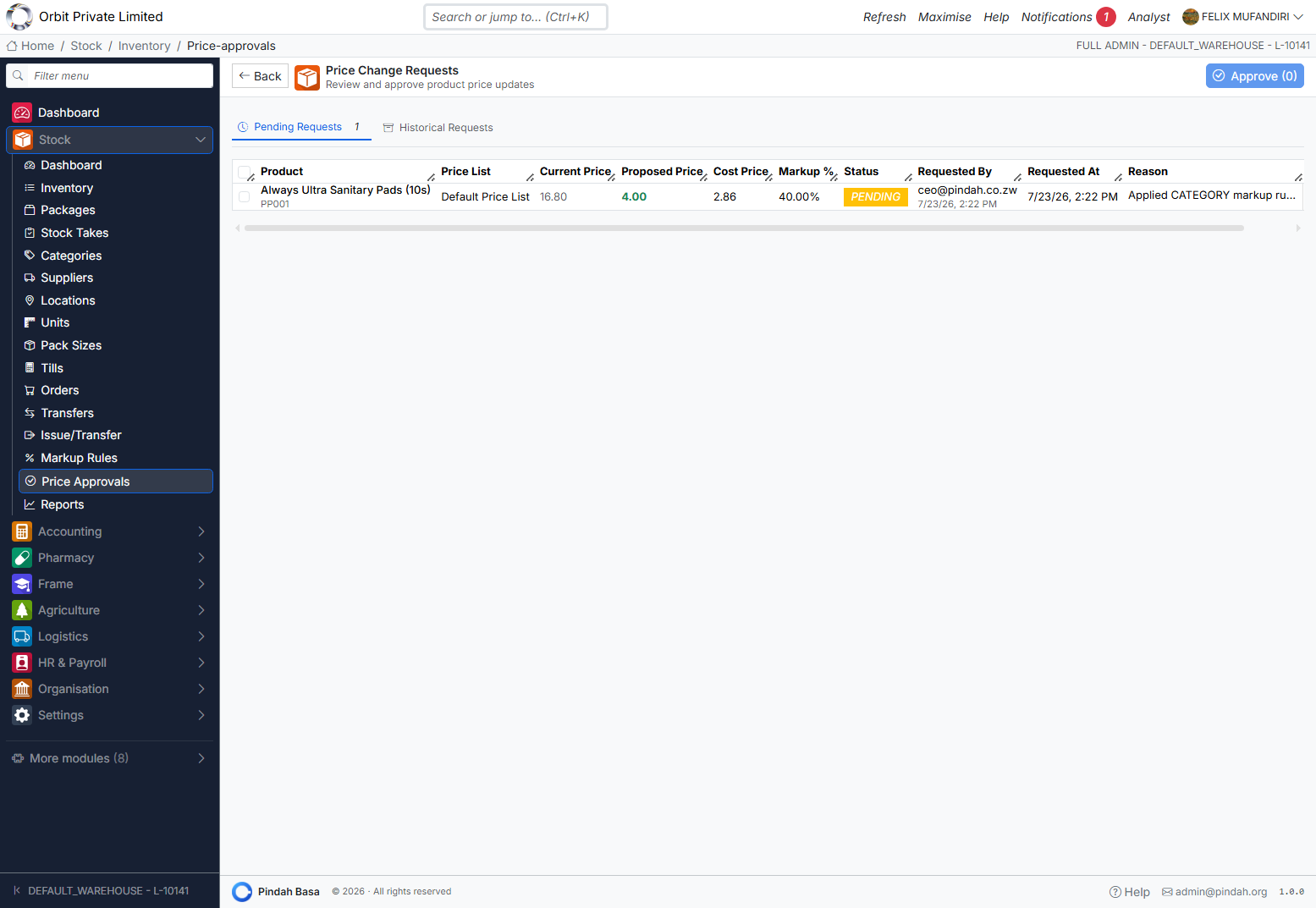
Manager review of proposed price updates.
Tabs: Pending Requests | Historical Requests
| Column | Meaning |
|---|---|
| Product | Name and code |
| Price List | e.g. Default Price List |
| Current / Proposed / Cost | Prices |
| Markup % | Proposed margin |
| Status | PENDING |
| Requested By / At / Reason | Audit |
Select rows → Approve (n) to push live. Reject via row actions where available.
Reports
Path: Stock → Reports
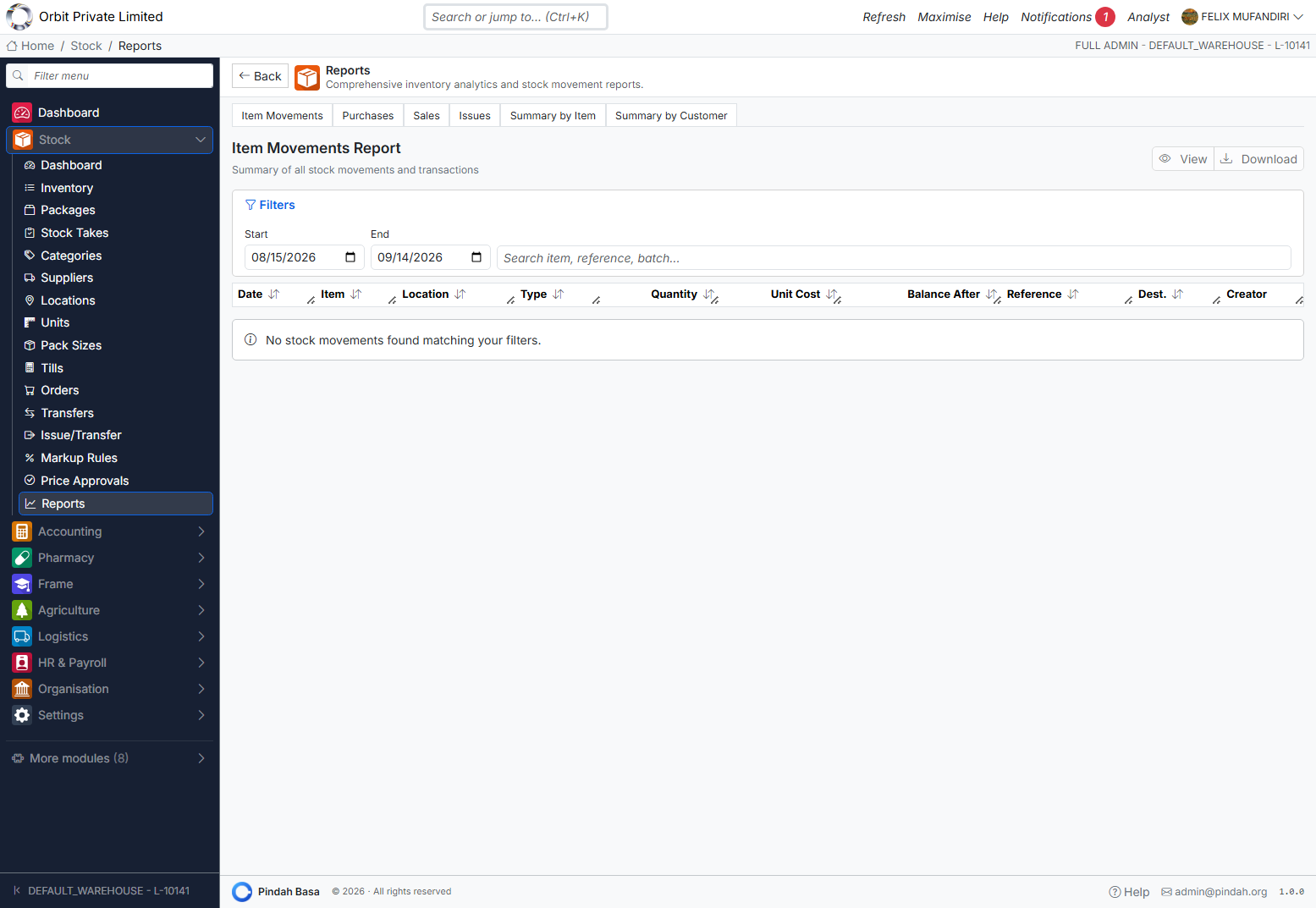
Tabs:
| Report | Purpose |
|---|---|
| Item Movements | All stock movements (default) |
| Purchases | Purchasing / receipt analytics |
| Sales | Sales by item |
| Issues | Issue summary |
| Summary by Item | Aggregated by product |
| Summary by Customer | Aggregated by customer |
Set Start / End dates, search item / reference / batch, then View or Download.
Movement columns typically: Date, Item, Location, Type, Quantity, Unit Cost, Balance After, Reference, Dest., Creator.
How Stock Connects to Other Modules
| Module | Connection |
|---|---|
| Accounting POS / Invoices | Sales reduce stock; COGS posts to GL |
| Accounting Purchase Orders | Commitment; physical receive is Stock Orders |
| Procurement | Supplier invoices / payments after goods received |
| Pharmacy | Dispense draws product stock (FEFO) |
| Organisation | Roles gate Stock screens |
Receipts with cost feed inventory valuation and optional GOODS_RECEIVED journals. Transfers and write-offs can post stock GL events when Accounting is configured.
Setup Guide for New Organisations
- Locations — create warehouses/stores; mark one Default.
- Tills — at least one till per selling location.
- Units and Pack Sizes.
- Categories (hierarchy as needed).
- Suppliers.
- Products — add or bulk import; set cost, sell, min/reorder.
- Markup Rules — Global default, then category/product overrides; Apply.
- Opening stock — via Receive Stock or opening quantity on products.
- Smoke test: receive → POS sale → transfer → stock take → Item Movements report.
Daily and Monthly Routines
Daily
- Confirm till / location.
- Receive Stock for deliveries.
- Process Transfers (approve / receive).
- Sell via Accounting POS / Pharmacy.
- Check Dashboard low stock and reorder proposals.
Weekly / monthly
- Run Stock Take for critical locations.
- Clear Price Approvals.
- Review NRV / dead stock on Dashboard; adjust or write down with finance.
- Run Item Movements and Purchases reports for the period.
Troubleshooting
| Situation | What to do |
|---|---|
| POS has no products | Select a Till linked to a location with stock |
| Cannot receive stock | Ensure supplier + location exist; use Receive Stock / fulfill order |
| Transfer stuck | Check status tab — approve, dispatch, or receive at destination |
| Sell price wrong after markup | Apply the rule; approve pending Price Approvals |
| Stock take variance unexpected | Confirm location scope; recount before Complete |
| Report empty | Widen date range; clear search; confirm movements exist |
| Dashboard shows dead stock | Review Top NRV table; Menu for item actions; align with finance write-down |
Support
- In-app Help and Guides
- Email admin@pindah.org
- Web pindah.org
- Platform basa.pindah.org
Pindah Basa · Inventory & Stock Management · © Pindah Private Limited